General Information for new players
If you add this mod to an existing savegame, you might get a lot of warnings of your existing contracts. It helps if you cancel them all and re-accept them to have a fresh start with thenew destination generator.
Debugging Guide
If you think, something with the route generation is not working well, please provide debugging information so that the developer can see, what may could be the reason.
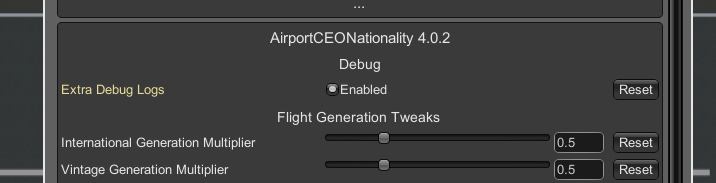
Ingame, press the F1 key to open the mod settings window.
First, enable the advanced settings.

Then enable “extra debug logs” at the AirportCEONationality section.
After that, wait a while ingame until new flights or your airline get offered. Or even do a restart of the game to clear previous offered flights.
When you got some flights offered, go to your logfiles by using the “open log” button in the F1 window.

How to read the logs by yourself
Every offered flight will create an entry in the log file. It determines all reachable airports of a typical size of that aircraft type. As in the example, the airport is in Spain and the Airline “Helvetic Airlines” with the offered E195 aircraft is in Switzerland. It offers valid airports in Switzerland for the E195 aircraft size.
FAQ
Does it support vanilla game contracts?
No, vanilla game contracts do not contain any country information. They act as national carrier to any destination.
Can I use this mod alongside the “ OLD TWEAKS AirportCEO Tweaks“ mod?
No. The mods will conflight eachother and the new nationality mod features might be ignored.
Can I change the country code of an airline contract?
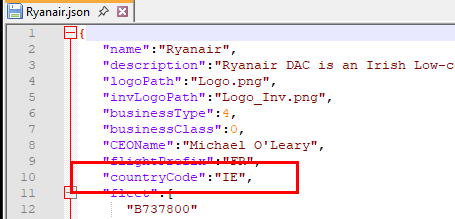
Yes. you can change the *.json file within the airline contract with an additional tag. If one of your mods does not have any country tag yet, you can add it. To change it, the mod must be copied to your native modding folder and to prevent conflicts, unsubscribe the mod on Steam.
BE AWARE, YOU ARE NOT ALLOWED TO REUPLOAD ANY OF YOUR CHANGED AIRLINES TO THE STEAM WORKSHOP. THESE CHANGES ARE FOR YOUR PERSONAL USE ONLY!
Can an airline contract have multiple home/BASE countries?
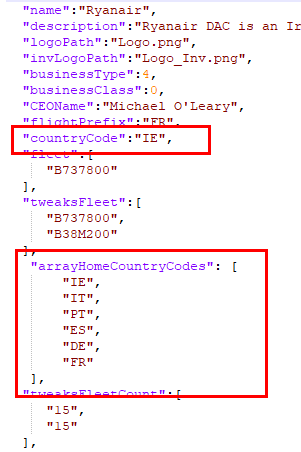
Yes, there is an additional option to set an array of home/base countries. Some airline mods such as Ryanair, Easyjet and others have this already implemented. To change it, the mod must be copied to your native modding folder and to prevent conflicts, unsubscribe the mod on Steam.
BE AWARE, YOU ARE NOT ALLOWED TO REUPLOAD ANY OF YOUR CHANGED AIRLINES TO THE STEAM WORKSHOP. THESE CHANGES ARE FOR YOUR PERSONAL USE ONLY!
Can I set an airline as domestic only?
Yes. This requires to have the airline in the native modding directory of your game. There you can change the *.json file within the contract with an additional tag. TAG FOLLOWS HERE LATER
BE AWARE, YOU ARE NOT ALLOWED TO REUPLOAD ANY OF YOUR CHANGED AIRLINES TO THE STEAM WORKSHOP. THESE CHANGES ARE FOR YOUR PERSONAL USE ONLY!
Will the airline contract offer flights only to their real destinations?
No, the airline will offer flights to all suitable airports within their range and allowed countries. It does not check any database for real life routes. If you want to get rid of some airports in other countries, you will have to change the airport database of the game. (see next point)
Can I change the airport sizes and add or remove airports?
Yes, the airport database of AirportCEO can be changed as you like. We recommend to keep a copy of the original file. CHANGES ARE AT OWN RISK. Also if Apog Labs decides to provide an update of the airports, the file can be overwritten.
The file is located at: \steamapps\common\Airport CEO\Airport CEO_Data\DataFiles\GameData\JSON\AirportData.json and can be edited by a Json editor or a notepad.
Does this mod support the Schengen agreement?
Yes. If your airport is within a Schengen country and the airline contract is from another Schengen country, flights will be offered as domestic. You need to activate the Schengen visa rules in the Gameplay settings.
How can I use small and medium stands for international flights and large stands for domestic?
Change the gameplay settings to “Realistic international stands”. After that, you get a toggle on each stand to switch it between domestic or international.

 -files to understand the route generation of small aircrafts in Canada. See the manual above.